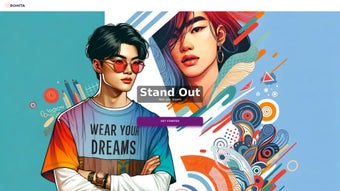

Download Bohita – AI‑Based Apparel Design Tool for Custom Clothing
If you’ve ever wanted to turn a simple idea into a striking t‑shirt, hoodie, or any piece of apparel without hiring a professional designer, Bohita is the answer. This AI‑driven design platform blends cutting‑edge Stable Diffusion technology with an intuitive interface, letting anyone create print‑ready graphics in seconds. Whether you’re a fashion hobbyist, a small boutique looking to expand its catalog, or a larger brand seeking rapid prototyping, Bohita provides a secure, cloud‑based workspace that makes custom clothing design fast, affordable, and surprisingly fun.
Overview
Bohita is a cloud‑native, AI‑powered apparel design tool that transforms plain fabric into wearable art. By leveraging Stable Diffusion, the platform turns natural‑language prompts—such as “retro 80s neon sunset” or “minimalist geometric pattern”—into high‑resolution graphics optimized for screen printing, DTG, and sublimation. The service eliminates the steep learning curve of traditional graphic design software; users simply select a garment type, type a description, adjust a few sliders, and receive multiple design variations within seconds.
Each output is automatically scaled and positioned for the chosen garment, ensuring that the final print looks crisp and professional. In addition to the core design engine, Bohita offers cloud storage, collaborative folders, and AI‑driven trend suggestions that keep your creations aligned with current fashion movements. While the platform currently lacks a full 3‑D garment simulation and relies on Bing for some plugin functionality, its strengths—speed, ease of use, and a growing ecosystem of community plugins—make it a compelling choice for anyone eager to launch custom apparel quickly and securely.
Key Features & Core Capabilities
- Stable Diffusion Design Engine: Generates original, high‑quality graphics from simple text prompts, delivering unique patterns that stand out on apparel.
- Multi‑Garment Support: Apply designs to t‑shirts, hoodies, tank tops, sweatshirts, and more, with automatic layout adjustments for each garment type.
- Instant 2‑D Preview & Real‑Time Editing: View designs on virtual mock‑ups instantly, tweak colors, scale, or positioning with a drag‑and‑drop toolbar.
- Print‑Ready Export Options: Download designs in PNG (300 dpi) or SVG formats, fully compatible with screen‑printing, DTG, and sublimation workflows.
- Collaboration & Asset Locking: Share project folders with teammates, gather feedback, and lock approved assets for production pipelines.
- AI‑Driven Trend Insights: The system analyses current fashion trends and suggests complementary color palettes or motif variations.
- Secure Cloud Storage: All projects are encrypted in transit (TLS 1.3) and at rest (AES‑256), giving you confidence that your designs remain private.
- Extensible Plugin Marketplace: Community‑created plugins add pattern libraries, fabric‑specific recommendations, and even automated mock‑up generators.
Beyond the feature list, Bohita continuously receives updates that improve generation speed, expand the style library, and refine trend‑prediction algorithms. The platform’s roadmap includes a full‑featured 3‑D garment visualizer, deeper integration with popular e‑commerce platforms, and advanced AI tools for stitching and embroidery design. By keeping the core experience lightweight while offering a robust plugin ecosystem, Bohita strikes a balance between simplicity for beginners and extensibility for power users.
Installation, Compatibility & Usage Guide
Step‑by‑Step Installation
- Navigate to the official Bohita website and click the Download for Windows or Download for macOS button, matching your operating system.
- The installer (
.exefor Windows,.dmgfor macOS) will download automatically. Open the file and follow the prompts to install Bohita in the default directory. - During setup, grant permission for cloud‑storage syncing. This enables automatic backup of all projects.
- Launch the application. The onboarding wizard helps you create an account using email, Google, or Microsoft SSO.
System Requirements (Operating System)
Bohita runs natively on Windows 10/11 (64‑bit) and macOS 11 (Big Sur) or later. A web‑based version is also accessible via modern browsers on Linux, iOS, and Android devices, providing cross‑platform flexibility for designers on the go.
Creating Your First Design
After logging in, the dashboard presents three main tabs: New Project, My Library, and Community Plugins. To start, click New Project and select a garment (e.g., “Unisex Hoodie”). A blank canvas appears alongside a prompt box.
Type a description such as “vintage surf sunset” and adjust the style sliders for detail, color saturation, and pattern density. Within seconds, Bohita generates four design variations. Hover over each thumbnail for a larger view, then click the preferred design to load it onto the garment mock‑up.
Use the toolbar to reposition, resize, or mirror the artwork. When satisfied, click Export to download the print‑ready file or choose Order Sample to have a prototype printed through Bohita’s partnered print‑on‑demand network.
Troubleshooting Common Issues
If designs fail to generate, verify your internet connection—Bohita’s AI runs on remote servers. For laggy previews, clear your browser cache or restart the desktop client. Plugin errors often stem from outdated Bing integration; updating the plugin resolves most connectivity hiccups.
Pros & Cons – Balanced Evaluation
Pros
- Rapid generation of high‑resolution, unique designs without any graphic‑design expertise.
- Broad garment support with automatic layout adjustments saves time.
- Print‑ready export formats (PNG, SVG) eliminate post‑processing steps.
- Secure cloud storage ensures designs are safe and accessible from any device.
- Continuous AI updates improve accuracy, trend relevance, and generation speed.
- Collaborative folders and asset locking streamline team workflows.
- Extensible plugin marketplace adds niche functionality on demand.
Cons
- No full‑featured 3‑D garment preview limits realistic fabric drape visualization.
- Reliance on Bing for some plugins can cause occasional connectivity delays.
- Free tier caps designs at 10 per month, which may be restrictive for power users.
- Advanced customization options (e.g., stitching patterns) require a paid upgrade.
- Effective prompt engineering has a learning curve for newcomers to AI design.
Overall Verdict: Bohita delivers a compelling blend of AI creativity and user‑friendly tools, making custom apparel design accessible to anyone. While the lack of 3‑D preview and occasional plugin dependencies are minor setbacks, the platform’s speed, security, and robust feature set outweigh these concerns, especially for small brands and individual creators.
Frequently Asked Questions
Is Bohita free to use?
Bohita offers a free tier that allows up to 10 designs per month. For unlimited access, higher‑resolution exports, and premium plugins, subscription plans start at $9.99 per month.Can I export designs for screen printing?
Yes. Exported files are available in PNG (300 dpi) and SVG formats, both fully compatible with screen‑printing, DTG, and sublimation workflows.Does Bohita support 3‑D garment visualization?
Currently Bohita provides 2‑D mock‑ups with realistic shading but no full 3‑D rotation or fabric‑drape simulation. A 3‑D preview feature is planned for a future update.What operating systems are compatible with Bohita?
Bohita runs natively on Windows 10/11 (64‑bit) and macOS 11 (Big Sur) or later. A web‑based version works on Linux, iOS, and Android browsers.How secure is my design data on Bohita?
All projects are encrypted in transit (TLS 1.3) and at rest (AES‑256). Users retain full ownership of their designs, and Bohita’s privacy policy states that data is never sold to third parties.Conclusion – Ready to Turn Ideas into Wearable Art?
Bohita bridges the gap between imagination and tangible fashion by harnessing AI’s generative power. Its intuitive workflow, rapid design turnaround, and professional export options make it an invaluable asset for creators of all skill levels. While a future 3‑D preview and reduced plugin reliance would enhance the experience, the current feature set already empowers users to launch market‑ready apparel in minutes. Whether you’re a solo artist, a boutique brand, or a larger fashion house exploring new concepts, Bohita offers a secure, scalable, and future‑proof solution.
Take the next step: Download Bohita now and start turning your ideas into wearable art today. Experience AI‑driven creativity and fashion freedom—your wardrobe will thank you.



.png)



